dymokomi/luced-message
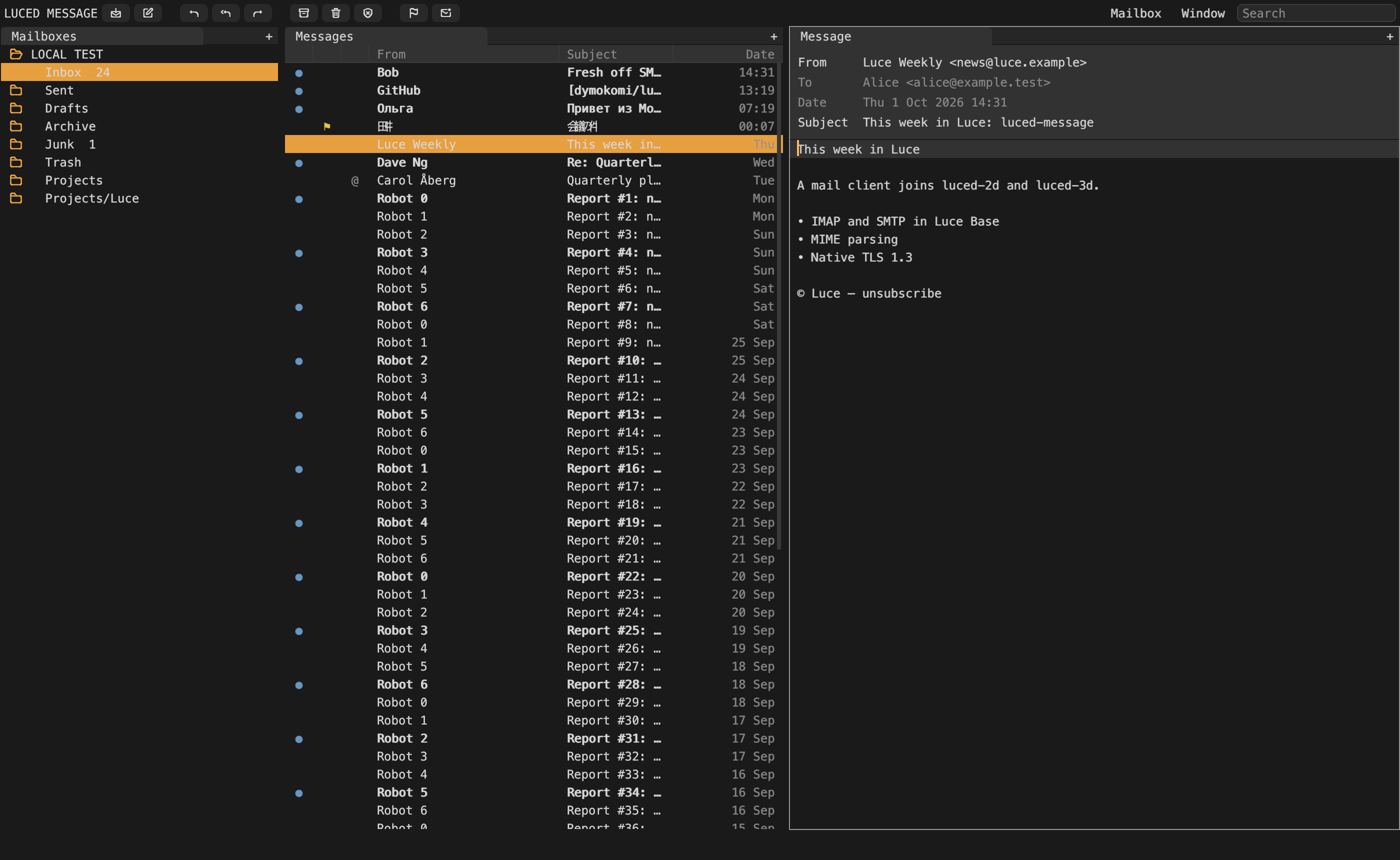
A messaging client written in Luce, with Apple Mail's working habits and luced's grey-and-orange docked panes: mailboxes, a message list and a reader, over sources (email first) synced in the background.
An application written in luce. Latest release 0.5.0.
Install#
luc install dymokomi/luced-messageDocumentation#
luced-message
A messaging client written in Luce. It works the way Apple Mail does, with a mailbox sidebar, a classic message list and a reader, and it looks like luced-2d and luced-3d: grey and orange docked panes, square icon buttons and monospace type. Messages come from sources. Email is the first source, read over IMAP and sent over SMTP. Mail syncs on a background thread, so the window never waits on the network.
luc install dymokomi/luced-message
# Or, from a development checkout:
luc run --release
Mailbox › Accounts… (Cmd/Ctrl-,) adds an account. Passwords live in the system keychain (luce-keychain), never in accounts.toml. You need the address, the password (use an app password for Gmail, iCloud and Fastmail), the IMAP server (port 993, tls) and the SMTP server (port 587, starttls, or 465, tls). TLS 1.3 is handled natively by luce-tls. Gmail, iCloud, Outlook and Fastmail all complete the handshake.
Using it
| Action | Keys | Toolbar |
|---|---|---|
| Get Mail | Cmd/Ctrl-Shift-N | get-mail |
| New Message | Cmd/Ctrl-N | compose |
| Reply / Reply All / Forward | Cmd/Ctrl-R / Cmd/Ctrl-Shift-R / Cmd/Ctrl-Shift-F | reply, reply-all, forward |
| Archive | Cmd/Ctrl-Alt-A | archive |
| Delete (to Trash) | Delete, Backspace | trash |
| Move to Junk | Cmd/Ctrl-Shift-J | junk |
| Flag / Mark as Unread | Cmd/Ctrl-Shift-L / Cmd/Ctrl-Shift-U | flag, mail-unread |
| Command Palette | Cmd/Ctrl-Shift-P |
- Message list: organized by conversation, as Mail is. A row is a whole thread, with its message count beside the date, and the reader stacks the thread newest first. View › Organize by Conversation (Cmd/Ctrl-Alt-O) turns this off. Delete, archive and junk act on the whole conversation. The list is newest first by date. A blue dot marks an unread message, a yellow flag a flagged one, and
@one with attachments. - Search: the search field narrows the list by sender and subject.
- Composer: Save Draft files the message in the account's Drafts folder, marked as a draft; Send hands it to the account's SMTP server and files a copy in Sent.
- Search: typing narrows the list by sender and subject; Enter searches the full text of the folder's messages on the server (IMAP SEARCH TEXT, UTF-8 included).
- Reader: shows the plain-text body, or HTML mail as readable text. Each attachment has a button that saves it.
- Status line: at the bottom of the window, it reports syncing, sending and failures.
How it works
The design notes give the whole picture. In short:
-
Protocol packages:
- The mail engine: each account has its own thread running a Base engine (
src/mail_sync.lucb). It keeps one IMAP session and syncs every folder: new headers, everyone's flags, and expunges. It fetches INBOX's newest bodies ahead of time, then waits in IDLE. Commands from the window run between those steps. - The store: everything is in the mail database,
~/.luced-message/mail.prism(luce-prism): an identity per account listing its folders, one per folder holding its messages' list fields and fetched raw messages, and an outbox. The engine writes it and the window reads it; events tell the window what changed. - Sources: the window works with
Source(src/sources.luc). EmailSource is the first kind; JMAP, Matrix or RSS would implement the same interface.
Develop
python3 tests/run.py                       # headless tests
tools/test-server.sh && tools/seed.py      # a local GreenMail with mail for alice@example.test
python3 tools/preview.py --home DIR        # a real frame of the window, synced, as build/preview.png
To use the local server, create DIR/accounts.toml with:
[local]
address = "alice@example.test"
imap_host = "127.0.0.1"
imap_port = 3143
imap_security = "plain"
smtp_host = "127.0.0.1"
smtp_port = 3025
smtp_security = "plain"
plus password = "secret": a local test account may name its password in the file, so freshly built binaries need no keychain permission. Real accounts never do; Mailbox › Accounts… keeps their passwords in the keychain.
Then run luced-message --home DIR.
Not yet
- OAuth2 sign-in for Gmail and Outlook. The protocol side, XOAUTH2, is ready.
- Multiple selection.
- HTML rendering through luce-browser-engine.
- TLS 1.2-only servers.
- East Asian wide characters need two cells in luce-ui's monospace layout.
License
Dual-licensed under Apache-2.0 or MIT, at your option. Icons are from luciaos-assets (CC BY 4.0).
Dependencies#
| Package | Version |
|---|---|
| dymokomi/luce-color | newest |
| dymokomi/luce-config | newest |
| dymokomi/luce-gpu | newest |
| dymokomi/luce-imap | newest |
| dymokomi/luce-keychain | newest |
| dymokomi/luce-mime | newest |
| dymokomi/luce-prism | newest |
| dymokomi/luce-smtp | newest |
| dymokomi/luce-std | newest |
| dymokomi/luce-tls | newest |
| dymokomi/luce-ui | newest |
| dymokomi/luce-window | newest |
Versions#
0.5.0
Browse source · pack · commit 637486cb9a3e
SHA-256 2ffb4ee6c0b43aa0c5c10d71cf2185f2a4c93b29e9fcd296d86656a8265b8409
engine storage is luce-std's collections; byte spans compare with ==; dependencies name no version