dymokomi/luced
A small native code editor written in Luce, built with the luce-ui Base library. It has a file explorer, editable monospace source pane, Luce/Luce Base syntax highlighting and folding, and a compiler/program output pane.
An application written in luce. Latest release 0.4.1.
Install#
luc install dymokomi/lucedDocumentation#
luced
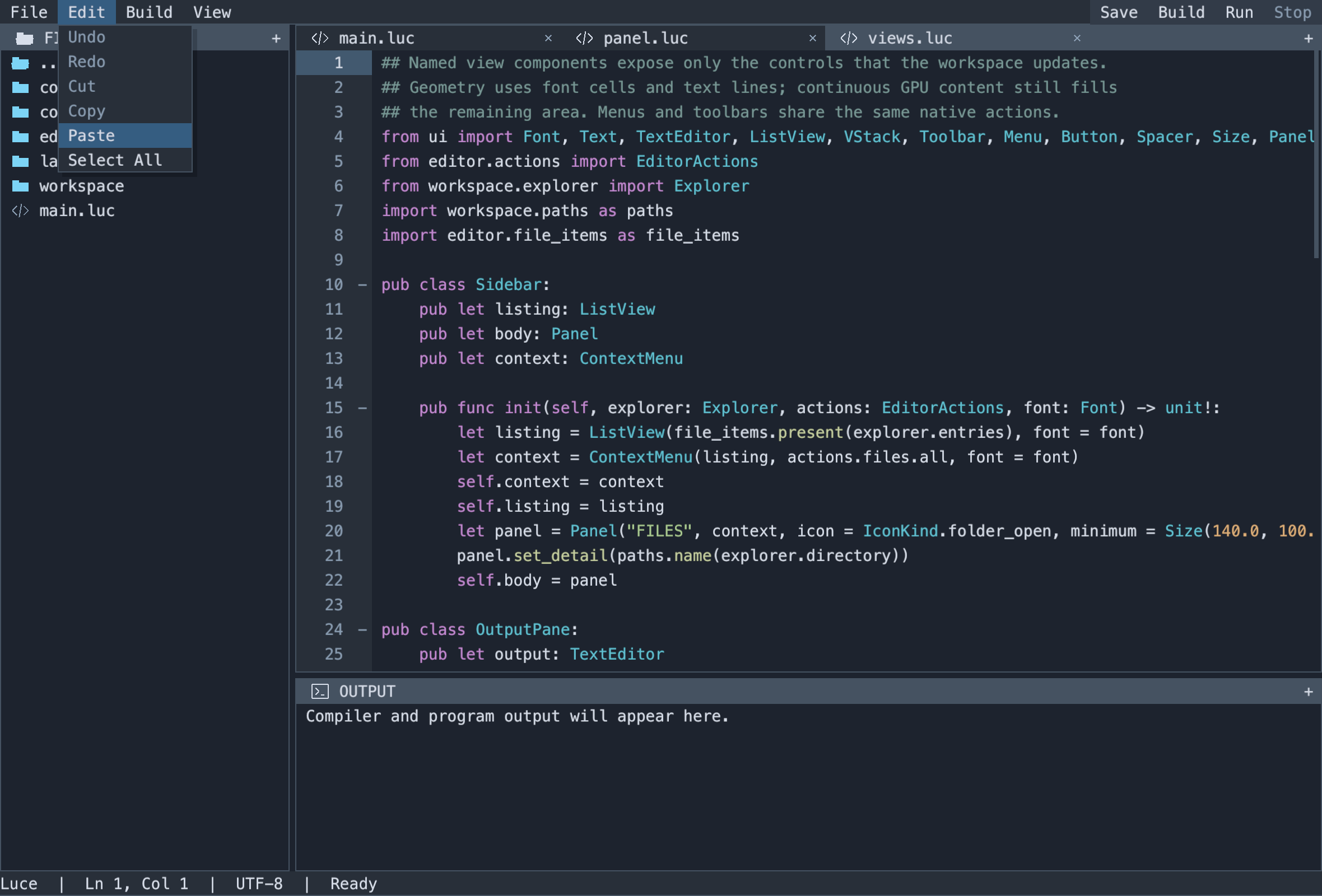
A small native code editor written in Luce, built with the luce-ui Base library. It has a file explorer, editable monospace source pane, Luce/Luce Base syntax highlighting and folding, and a compiler/program output pane. The workspace uses tabbed panels with themed borders and resizable splits. Their flat title bars share the frame color, with padded vector icons and a trailing +. The explorer has folder and file-type icons; the source header shows the filename first and its directory as secondary text. Right-click menus, command search and editable user configuration are shared through ordinary luce-ui components. Popups have sharp shadows. Open top-level menus switch as the pointer crosses their titles; Left/Right also switch. Controls and pane borders respond to hover. See the native menu preview.
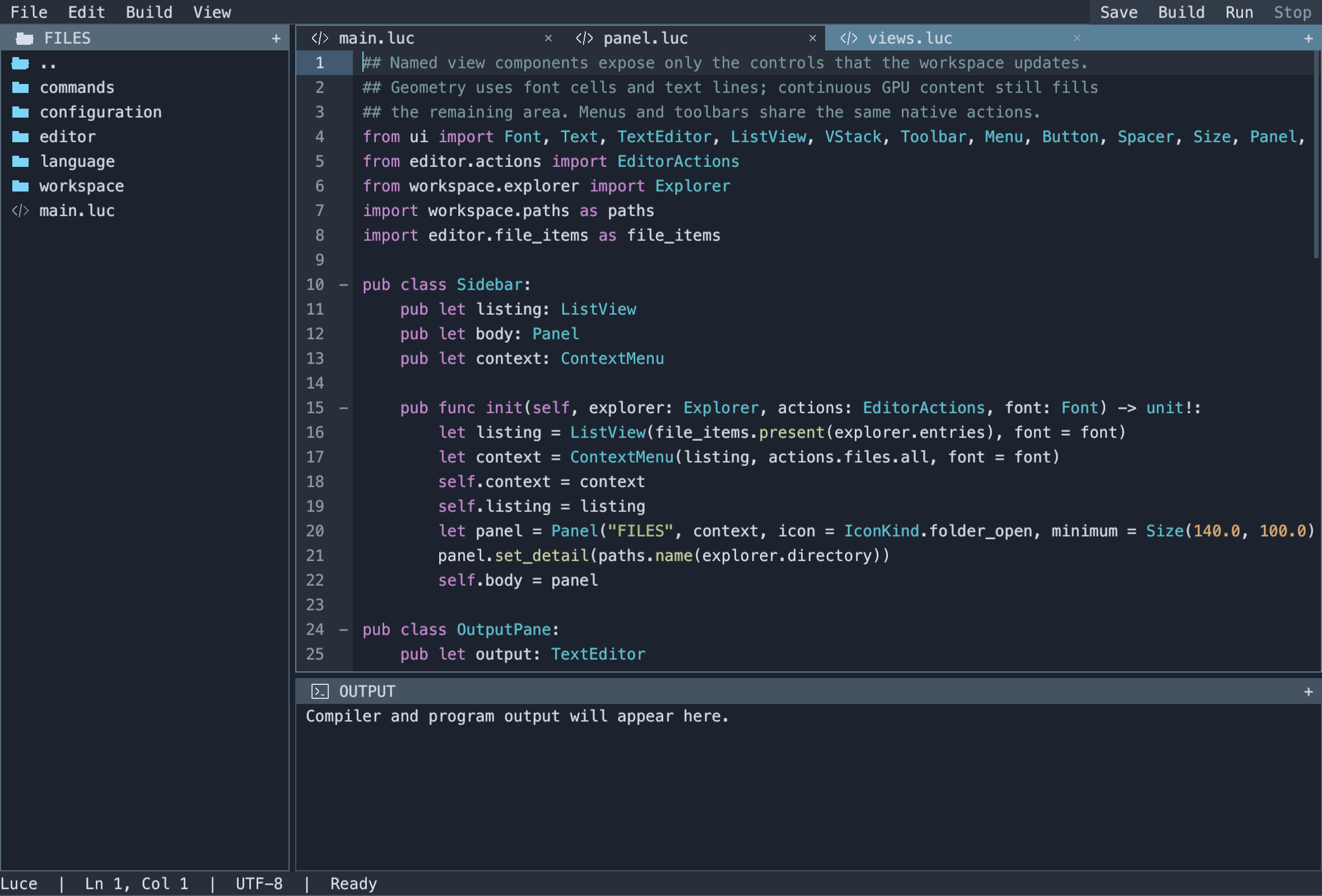
Open files retain their own selection, scrolling, folds, unsaved edits and undo history. Saves replace files atomically, preserve existing permissions and CRLF line endings, and refuse to overwrite changes detected on disk. Build and Run use cancellable background commands so the UI stays responsive.
Projects
Open luced on a directory that holds a package.prisma and it is in project mode: the FILES pane hides what luc generates (build/, .luc/, luce.toml), the status bar names the project (luced 0.1.1 · application · luce), and Build and Run go through luc in the project root, so the whole project builds with its dependencies rather than the selected file alone. Outside a project, Build and Run compile the selected file as before.
The FILES pane's menu creates projects: New Package (a library), New Tool (a terminal program) or New Application (a desktop window). Each runs luc new with that kind and opens the result. luced never reads package.prisma itself; it asks luc info, so the editor and the tool always agree on what a project is.
Build and open
Keep luced, luce-ui, luce, and luce-base as sibling checkouts. The tested revisions are recorded in bootstrap/. Build the native compilers first:
(cd ../luce-base && ./build.sh)
(cd ../luce && LUCE_BASE_COMPILER=../luce-base/build/luce-base ./build.sh)
python3 tools/build.py
./build/luced examples/hello/main.luc \
  --luce ../luce/build/luce --base ../luce-base/build/luce-base
On Windows, use the repositories' tools/build_windows.py scripts to build the compilers. The editor build script selects .exe automatically; launch build/luced.exe and pass the corresponding compiler paths. Native Windows GUI requires the existing Vulkan backend and loader. macOS uses Metal. Linux builds and runs the portable tests; its native window backend is still pending.
A path may name a directory or a UTF-8 file. With no path, the explorer starts in the working directory. Compiler names default to luce and luce-base on PATH; explicit paths are useful when developing the language alongside the editor. Only the requested executable is produced by the app build. Editor builds place program binaries under the nearest package's build/ directory.
Controls
| Action | Control |
|---|---|
| Open a file or directory | Click its explorer row; arrows and Enter also work |
| Save current file | Save, Cmd/Ctrl+S |
| Save all open files | File menu, Cmd/Ctrl+Shift+S |
| Build current source | Build, Cmd/Ctrl+B |
| Build and run current source | Run, F5 |
| Cancel compiler or program | Stop, Shift+F5 |
| Indent / outdent | Tab / Shift+Tab |
| Undo / redo | Cmd/Ctrl+Z / Cmd/Ctrl+Shift+Z; Ctrl+Y also works |
| Move focus out of the editor | Ctrl+Tab |
| Scroll | Wheel or touchpad; editor scrollbar also drags |
| Add a tab or split | The trailing + menu in any pane |
| Move a panel | Drag its tab or unused header space; center stacks, content edges split |
| Cancel docking | Escape or release outside the workspace |
| Close a document tab | Its ×; unsaved documents stay open |
| Switch overflowed tabs | Header arrows or wheel |
| Resize panes | Drag any divider |
| Switch an open top-level menu | Hover another title, or Left/Right |
| Resize with keys | Focus a divider, then arrows; Shift moves faster; Home/End reach limits |
| Toggle a fold | Click its gutter marker; View menu; Cmd/Ctrl+Alt+[ on the header |
| Fold / unfold all | View menu; Cmd/Ctrl+Alt+Shift+[ / Cmd/Ctrl+Alt+Shift+] |
| Context menu | Right-click; Shift+F10 for the focused control |
| Search commands | Cmd/Ctrl+P; type words, arrows to select, Enter to run, Escape to dismiss |
| Cycle panels | F6 / Shift+F6 |
| Focus explorer / editor / output | Cmd/Ctrl+1 / Cmd/Ctrl+2 / Cmd/Ctrl+3 |
Closing with unsaved files keeps the window open and shows a status message. Save all before closing again, or choose File → Discard & close after that message. Build and Run save open documents first and compile the selected source as the entry point. There is no shell expansion or implicit project task configuration.
The explorer highlights the row under the pointer, and its right-click menu follows what was clicked. Empty space offers New File, New Folder, Paste, a Show/Hide Hidden Files toggle and Refresh; a folder adds Copy Path, Rename and Delete and takes new entries and pastes inside itself; a file offers Cut, Copy, Copy Path, Rename and Delete. Cut and Copy remember a path; Paste places it in the target folder, choosing an unused copy name rather than overwriting. Creation and rename refuse existing destinations. Renaming or moving a folder updates the paths of its open documents. Deletion refuses unsaved open documents and removes a directory's contents only after confirmation. The editor menu exposes editing, save and folding commands. The output menu copies selected output, selects all or clears it. Right-clicking a row selects it without opening it; right-clicking selected text preserves the selection. Pane dividers show two border edges at rest; their center grip appears on hover, dragging or keyboard focus. The gutter highlights the caret's row and gives a separate hover cue over line numbers and fold markers. The line-number gutter fits the document's largest number, with one character cell of padding on each side. It grows and shrinks as lines are added or removed; scrolling and folding keep its width stable.
User settings and theme
On first launch, luced creates ~/.luced/settings.toml and theme.toml. On Windows this means %USERPROFILE%\.luced; on macOS/Linux it uses $HOME/.luced. Existing files are preserved. Edit Settings and Edit Theme in the command palette or File menu open them as ordinary editor documents.
settings.toml configures the shared monospace font, initial window dimensions and compiler commands. theme.toml configures UI and syntax colors using sRGB #RRGGBB strings, including gutter and active_border. Save changes to apply them within half a second, or choose Reload Configuration. Font changes apply to all controls together; window dimensions apply at the next launch. Compiler paths supplied on the command line override the file.
Pane header spacing uses [layout] header_inset_cells in theme.toml (default 1.5 character cells) and controls round by control_radius. The tab strip is strip, the selected tab and pane are panel, each pane's bottom shelf is sunken; the shipped palette is eleusis-layout's greys and orange.
Both files are validated before application. Invalid edits remain available for correction, with an error in the status bar and the current configuration retained. Malformed startup files use defaults and report the problem. The supported TOML forms and defaults are described in configuration design. Use --config-dir DIRECTORY for an isolated profile; tests and previews do this.
Structure and tests
src/workspace: files, documents, document-tab lifetime, navigation and application coordination.src/language: a stateful line lexer, incremental highlighting cache, indentation/string folding and syntax palette.src/editor: options, shared actions, named pane views and application lifetime.src/configuration: scalar TOML parsing, settings/theme schemas and user file storage.src/commands: asynchronous compiler/program orchestration.src/main.luc: parse options, construct the editor, run.luce-ui: reusable actions, toolbars, menus, themes, panes, splitters and text controls.- Base standard library: native text input, clipboard, files and process resources.
python3 tests/run.py
./build/luced examples/hello/main.luc --smoke
# macOS: read back the editor's actual Metal frame in an isolated test build
python3 tools/preview.py --source examples/hello/main.luc
python3 tools/preview.py --source src/editor/views.luc --fold
python3 tools/preview.py --source src/editor/views.luc --palette
python3 tools/preview.py --source src/editor/views.luc --context files
python3 tools/preview.py --tabs --dock preview
Tests cover bounded line retokenization, randomized Unicode edits and full-lexer equivalence, multiline strings, nested folding across edits, undo/redo, stale decorations, CRLF persistence, external-file conflicts, workspace focus, and real native build/run output. Configuration tests cover defaults, invalid input, theme reload, palette commands, file prompts, collisions, folder renames, dirty-file deletion and pane shortcuts. Workspace tests move live documents between groups, reopen existing tabs, target saves after tab clicks, fill new splits and refuse to close unsaved tabs. The UI and standard-library repositories have their own control, ownership, input, pixel, file and process regression suites. CI runs on all three hosts.
This is a proof of concept. The output pane displays captured compiler/program output; it is not an interactive PTY shell. Every control shares the configured monospace font (14 points by default), including toolbar buttons and output. luce-ui loads the native face and caches antialiased text at the display resolution (Menlo on macOS, Consolas on Windows, system monospace on Linux). Font shaping, grapheme navigation, accessibility, richer IME presentation, search, completion, debugging and language-server integration remain future work. Files are bounded to 4 MiB on read and 1,048,576 editor scalars. DStack supports 128 panels, including the explorer/output and empty editor tabs, in up to 32 groups. See the checklist and compiler follow-ups.
Framework iteration
Chrome uses one font line per row, one character cell of control inset and 1.5 cells of pane header inset. File symbols are ordinary ListItem presentation data; src/editor/file_items.luc maps explorer entries to icons, while the filesystem model stays independent of UI. Colors and density come from luce-ui's inherited Theme; menus, buttons and shortcuts share Action instances. Popup placement and focus belong to the framework. The editor's named views are in src/editor/views.luc.
Highlighting runs from the affected line until cached multiline state converges. It publishes only that interval synchronously, with a revision check. Existing highlights are transformed through the edit, so there is no uncolored debounce frame. A 1,000-line regression checks that an ordinary edit scans one line.
The design and checklist records the framework contracts and the Qt, SwiftUI, VS Code, Vim and Emacs references behind them.
Pane borders and both dividers are ordinary luce-ui components. Scroll bounds follow the longest visible line and visible row count, including after folding and resizing. Folding covers indented blocks and multiline strings in both Luce and Luce Base. It preserves source offsets, highlights and undo history; opening a parent fold restores its children's collapse state. See the pane and folding design.
Dynamic workspace
Each open file has its own tab. Reopening a file selects its existing tab; moving it preserves text, undo/redo, selection, scroll position and folds. The + menu offers Split Vertical (side by side), Split Horizontal (above/below) and Add Tab. Each creates an empty editor ready for a file from the explorer.
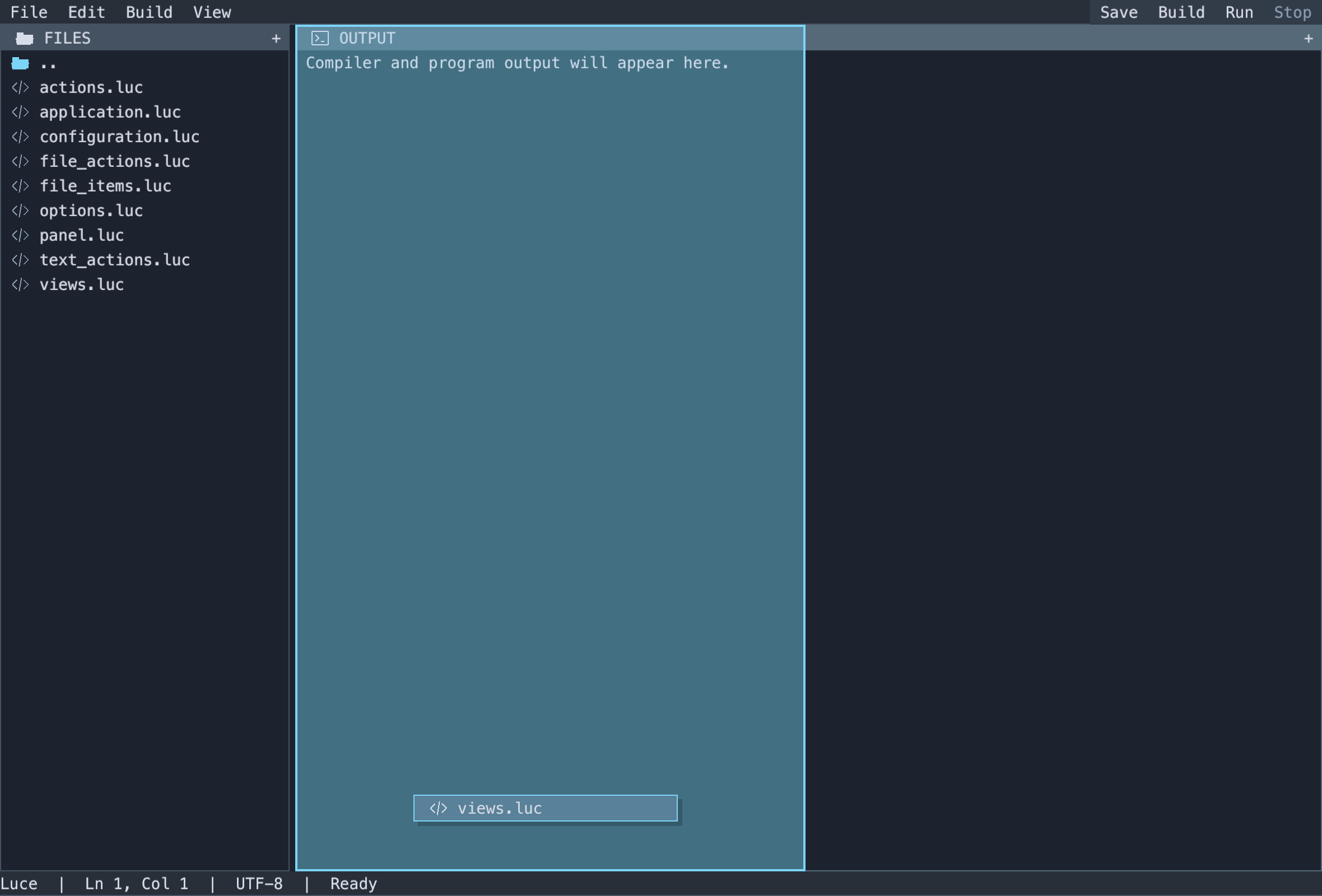
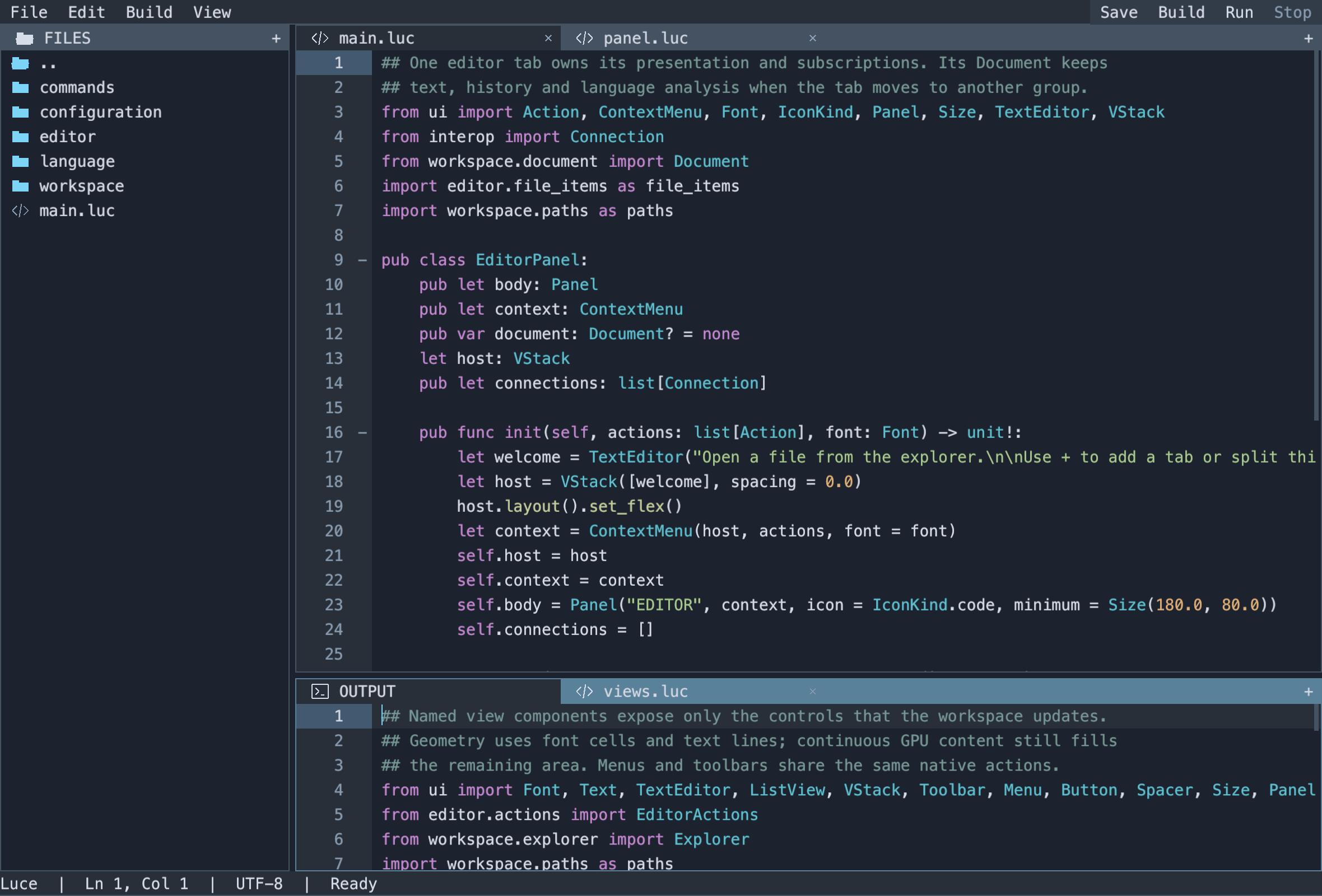
Drag a tab onto another header or the middle of its content to stack it there. Drop over a content edge to split that group. When dragging starts, the panel detaches visually and its neighbors expand. A floating filename follows the pointer, and the destination outline uses that expanded layout. Escape or an outside release restores the original layout, including split sizes and tab order. Empty split branches collapse. Explorer and output panels can move or stack with document tabs too. F6 navigation follows the visible groups; the explicit explorer/editor/output shortcuts reveal hidden tabs before focusing their content.
Text editors, clickable controls, pane headers and resize handles show the appropriate system cursor. Dragging keeps a grabbing cursor over a valid target and a forbidden cursor outside the workspace.
See the native captures of a detached pane and proposed split and an editor stacked with Output.
src/editor/panel.luc defines one editor panel; src/workspace/editors.luc owns document-tab selection and close policy. All split geometry, tab controls, pointer capture and previews belong to luce-ui's DStack. The current layout lasts for the session; saved layouts and floating windows are future work.
Dependencies#
| Package | Version |
|---|---|
| dymokomi/luce-ai | newest |
| dymokomi/luce-clipboard | newest |
| dymokomi/luce-config | newest |
| dymokomi/luce-gpu | newest |
| dymokomi/luce-regex | newest |
| dymokomi/luce-std | newest |
| dymokomi/luce-textmate | newest |
| dymokomi/luce-ui | newest |
| dymokomi/luce-window | newest |
Versions#
0.4.1
Browse source · pack · commit 64768c14e98b
SHA-256 fa0f3753c58caae68662710a4dcdf02e85a5dc24e06e95a23fa4e7321e3ac691
dependencies name no version